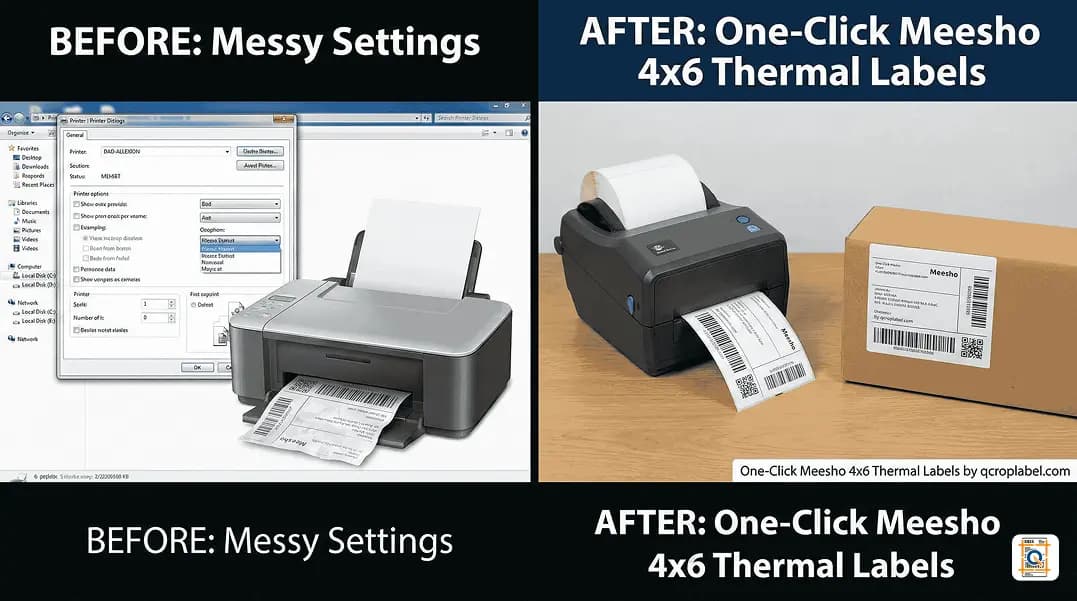
Skip the design lab headaches – crop Meesho labels to 4x6 in one click and print like a pro.
Introduction: Why Label Cropping Matters More Than You Think
Fast dispatch is not just about packing speed. If the label is wrong, the parcel might never reach the buyer.For Meesho sellers, a cropped barcode, half-visible address, or wrongly sized label can mean:
- Failed pickup attempts.
- Delayed deliveries.
- Increased returns and angry customers.
That is why more and more sellers are searching for the best free Meesho label crop tools online to fix these problems once and for all.
Among the different methods, a focused Meesho label crop tool like Q Crop Label stands out for one reason: it is built exactly for this job.
The Main Ways Sellers Try to Fix Meesho Label Sizes
Most Meesho sellers go through some or all of these options:1. Adjusting Printer Settings Manually
Changing paper size, margins, scaling and orientation inside the print dialog is usually the first attempt.
Problems:
- Every printer behaves differently.
- One setting works for one label, fails on another.
- Team members often forget the "correct" combination. It becomes a daily guessing game.
2. Using Meesho Design Lab Label Size Print Options
Meesho Design Lab offers options to tweak label size print and layout, but it is not specifically optimized for 4x6 thermal label output.
Common issues:
- Label still doesn't match exact 4x6 dimensions (101.6 mm × 152.4 mm).
- Unwanted white borders or squished content.
- Inconsistency across orders.
3. Editing PDFs in General Tools
Some sellers drag labels into PDF editors or graphic tools, trying to manually crop them. This is time consuming, hard to repeat, and prone to mistakes around barcodes.
For sellers handling tens or hundreds of orders a day, this is not sustainable.
Why a Dedicated Meesho Label Crop Tool is Different
A specialized Meesho label crop tool like Q Crop Label flips the approach: instead of you adjusting your workflow to the printer, it reshapes the Meesho PDF label to fit the printer perfectly.Key advantages:
- Automatic cropping of the label area.
- Consistent 4x6 thermal format output (4 inches × 6 inches / 101.6 mm × 152.4 mm).
- No need to remember complex printer settings.
- Easy for anyone in the team to follow.
The result is a clean, ready-to-use Meesho 4x6 thermal label converter experience.
How Q Crop Label Solves the Meesho Shipping Label Crop Issue
One-Click Conversion for Meesho Labels
The workflow is intentionally simple:
- Upload your Meesho PDF.
- The system runs Meesho thermal label cropping (4x6) behind the scenes.
- You download a label that fits perfectly on standard 4x6 rolls.
No trimming. No resizing. No reprints.
Designed Around Real Meesho Seller Problems
Q Crop Label focuses on specific pain points:
- Barcodes getting cut off – avoided by maintaining safety margins of at least 3 mm on each side.
- Important details missing – full address, phone number, order ID kept inside visible area.
- Labels printing too small – by cropping before scaling to 4x6, the content stays readable even on budget 203 DPI thermal printers.
Instead of being a generic PDF editor, it acts like a smart Meesho 4x6 thermal label converter tuned to real shipping labels.
Why It Deserves the "Best Free Meesho Label Crop Tool Online" Tag
To be considered among the best free Meesho label crop tools online, a tool must: - Work directly with Meesho PDF labels. - Produce correct 4x6 thermal label output without hacks. - Be fast enough for daily order processing. - Be easy to use for staff who are not tech-savvy.Q Crop Label ticks these boxes by:
- Keeping the interface simple – just upload and download.
- Avoiding hidden paywalls for basic cropping.
- Focusing on accuracy for real-world Meesho label layouts.
For sellers regularly dealing with Meesho shipping label crop issues, it becomes a natural part of the dispatch routine.
Best Practices for Printing Meesho 4x6 Thermal Labels
Use the Right Paper Size on Your Printer
Set your thermal printer paper size to 4x6 inches or 100x150 mm, depending on your device. In your printer driver, set the resolution to 203 DPI (standard) or 300 DPI for sharper barcodes. Disable "Fit to page" or forced scaling if possible. Print at 100% or "Actual Size" to avoid shrinking.
Keep Your Thermal Printer Clean
Clean the print head regularly with isopropyl alcohol wipes every 500–1,000 labels printed. Use good quality 4x6 thermal labels — extremely cheap rolls (often priced below ₹400 per 500-roll pack) can fade or smudge quickly, leading to failed barcode scans.
Test Once, Then Standardize for Your Team
Once you have:
- Converted a label using Q Crop Label.
- Printed it correctly on your thermal printer.
Save those exact printer settings and teach the same procedure to your team. Pin a printed cheat-sheet near the packing station showing the three settings: paper size 4x6, scale 100%, and no auto-fit.
Handling Bulk Meesho Orders Without Losing Time
When order volume increases: - Download all Meesho labels in PDF. - Run them through the Meesho thermal label cropping 4x6 workflow using Q Crop Label. - Print all converted labels in one batch. - Stick labels while sorting parcels by route or courier.This saves label rolls, speeds up dispatch, and reduces return risk. Sellers processing 100+ orders per day in 2026 report saving 30–45 minutes on labelling alone by switching to a batch-convert workflow.
From "Trial and Error" to a Clean, Predictable Process
By shifting to a consistent convert-Meesho-PDF-to-4x6 workflow using Q Crop Label: - Every label looks the same. - Barcodes sit in a stable, scannable area. - Addresses and COD details remain clearly visible.Instead of juggling settings, the team just follows: convert → print → pack → ship.
When Should a Meesho Seller Start Using a Label Crop Tool?
If any of these sound familiar, it is time to switch: - Labels frequently come out cut, shrunk or off-center. - Delivery partners often complain that barcodes do not scan. - Staff members ask which print settings to use "every single day".In that case, a dedicated, best free Meesho label crop tool online like Q Crop Label is no longer a luxury — it is a necessity.
Frequently Asked Questions
Q: What is the correct size for a Meesho 4x6 thermal label? A: The correct size is 4 inches × 6 inches, which equals 101.6 mm × 152.4 mm. Always set your thermal printer paper size to these exact dimensions and print at 100% scale with no auto-fit to get accurate results.
Q: Is Q Crop Label really free to use for Meesho sellers? A: Yes. Basic Meesho label cropping is available without a paywall. There are no hidden fees for standard 4x6 conversions, making it suitable for small sellers and high-volume operations alike.
Q: Why does my Meesho barcode get cut off when I print the label directly? A: Meesho PDFs are often generated with extra white space or in A4 format. When your printer scales or centres the page, the barcode area can shift outside the printable zone. Running the PDF through a dedicated Meesho label crop tool trims the page to exactly 4x6 before printing, so the barcode always lands within the safe print area.
Q: Can I use Q Crop Label for bulk Meesho orders in 2026? A: Yes. You can upload multiple Meesho label PDFs, convert them in a batch, and download all cropped 4x6 labels ready for printing. This is especially useful when processing 50 or more orders per dispatch cycle.
Q: What printer settings should I use after cropping a Meesho label with Q Crop Label? A: Set paper size to 4x6 inches (101.6 mm × 152.4 mm), print scale to 100% or "Actual Size", resolution to 203 DPI or higher, and turn off any "Fit to page" or "Shrink to printable area" options in the print dialog. These three settings together give you clean, scannable labels every time.
Frequently Asked Questions
What is the correct size for a Meesho 4x6 thermal label?
The correct size is 4 inches × 6 inches, which equals 101.6 mm × 152.4 mm. Always set your thermal printer paper size to these exact dimensions and print at 100% scale with no auto-fit to get accurate results.
Is Q Crop Label really free to use for Meesho sellers?
Yes. Basic Meesho label cropping is available without a paywall. There are no hidden fees for standard 4x6 conversions, making it suitable for small sellers and high-volume operations alike.
Why does my Meesho barcode get cut off when I print the label directly?
Meesho PDFs are often generated with extra white space or in A4 format. When your printer scales or centres the page, the barcode area can shift outside the printable zone. Running the PDF through a dedicated Meesho label crop tool trims the page to exactly 4x6 before printing, so the barcode always lands within the safe print area.
Can I use Q Crop Label for bulk Meesho orders in 2026?
Yes. You can upload multiple Meesho label PDFs, convert them in a batch, and download all cropped 4x6 labels ready for printing. This is especially useful when processing 50 or more orders per dispatch cycle.
What printer settings should I use after cropping a Meesho label with Q Crop Label?
Set paper size to 4x6 inches (101.6 mm × 152.4 mm), print scale to 100% or Actual Size, resolution to 203 DPI or higher, and turn off any Fit to page or Shrink to printable area options in the print dialog. These three settings together give you clean, scannable labels every time.
About Q Crop Label
Q Crop Label helps 100,000+ Indian e-commerce sellers optimize their shipping workflow. We write about thermal printing, label management, and practical tips to help Amazon, Meesho, and Flipkart sellers save time and money on every order.